Timeline
Public Changelog
v1.13.0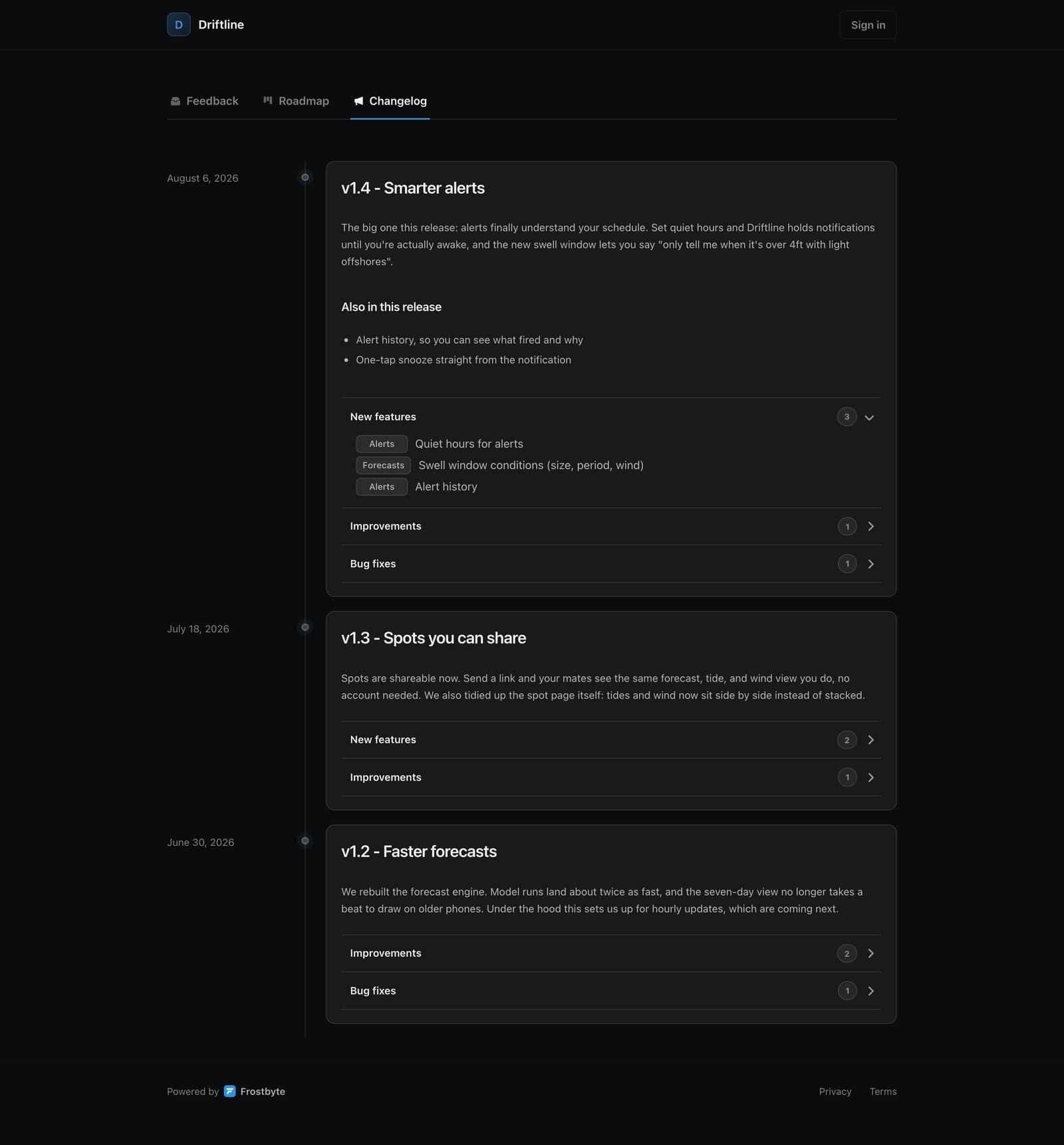
Your Feedback Portal now has a Changelog tab: a public timeline of everything you've shipped, built straight from your releases. Each entry carries the release notes you wrote (or auto-generated) plus a breakdown of the tasks that went out with it, grouped into new features, improvements, and bug fixes with their area labels.
Nothing shows up until you choose to publish. Complete a release that has notes and Frostbyte asks whether to put it on the changelog; you can also publish or remove any completed release later from its Changelog property. And if a release gets pulled back out of Completed, it comes off the public page automatically, so an unshipped release can never sit there.
Close the loop in email
When feedback ships and Frostbyte emails the person who asked for it, that email now links straight to the release's changelog entry. They can read exactly what went out instead of taking your word for it.
On every plan
The changelog is free on every tier, including Free. Shipping in public shouldn't be a paid feature. If you'd rather keep it private, switch it off any time in your portal settings.
New features
- Feedback Hub Public changelog tab on the Feedback Portal, built from your published releases
- Releases Publish release notes when completing a release, or later from the release's Changelog property
- Feedback Hub Task breakdowns under each changelog entry, grouped by type with area labels
- Emails Shipped-notification emails link straight to the release's changelog entry
- Feedback Hub Changelog toggle in portal settings, available on every plan
Improvements
- Releases Un-completing a release removes it from the public changelog automatically
- Releases Release activity records changelog publishes and removals
Images and Files
v1.12.0Projects can now have a logo and people can have a profile picture, so a shared project stops looking like a list of initials. Upload an image, Frostbyte resizes and re-encodes it, and it shows up everywhere that project or person appears.
Images are stored privately and served through Frostbyte, not from a public bucket, so nothing you upload ends up sitting on an open URL.
Attachments on tasks and feedback
A screenshot explains a bug faster than three paragraphs do. Tasks and Feedback Hub submissions now take attachments: images, PDFs, plain text, and CSV files.
Task cards show a badge when there's something attached, and clicking an image opens it full size instead of downloading it. People submitting to your public Feedback Hub can attach a screenshot too, so bug reports arrive with the evidence already in them.
One shell, fewer dead ends
The navbar is gone. Your account, your projects, and the quick actions you reach for most all live in the sidebar now, and creating a project happens in an overlay on top of the app instead of a separate page you have to come back from.
New projects open with a short guided setup and a Feedback Hub already provisioned, so there's nothing to go and switch on before you can share a link.
Getting back in
You can reset a forgotten password from the login page, and a project you deleted can be recovered rather than being gone the moment you click confirm.
New features
- Projects Project logos and profile pictures
- Tasks Attachments on tasks: images, PDF, TXT, and CSV, with a badge on the card when a task has one
- Feedback Hub Attachments on public Feedback Hub submissions, so bug reports can carry a screenshot
- Tasks Click an attached image to open it full size
- Auth Password reset from the login page
- Projects Project recovery after a delete
- Projects Create a project in an overlay without leaving the app
- Navigation Quick actions in the project sidebar
Improvements
- Navigation The navbar is gone and your account now lives in the sidebar
- Signals Pending signals show on the dashboard so nothing sits unreviewed
- Tasks Quick edit sets status, type, and priority straight from the task row
- Onboarding New projects come with a Feedback Hub already set up and a guided first-run
- Performance Moving between project pages is noticeably faster
- Agent The Agent tells you when you're out of credits instead of starting a reply it can't finish
Bug fixes
- Tasks Long task titles no longer collide with the ID badge or get clipped in quick edit
- Profiles Public profiles no longer error for logged-out visitors
Signals
v1.11.0Feedback from your public Feedback Hub, bug reports, ideas you had in the shower, something a user said on a call. All of it now lands in one place. Signals replaces the old Inbox and the separate feedback and bug queues with a single reviewable stream.
Capture a signal yourself from the Signals page, or let your coding agent capture one over MCP while it works. Every signal carries its type, its source, and, for public submissions, the votes behind it.
Every signal gets a decision
Collecting feedback is easy. Deciding what to do with it is the part that gets skipped, so Signals asks you to decide. Open a signal and you have four outcomes: create a task, link it to a task you've already planned, save it for later, or dismiss it with a reason.
Each decision records who made it, when, and why, and the history stays on the signal. A dismissed request you reopen six months later still shows the original call.
Accepted work carries its evidence
Accepting a signal creates a task in your backlog, not in your active release. Deciding something is worth doing and deciding it ships next are two different decisions, and Tasks now has a Backlog view for exactly that reason.
The linked signals ride along on the task, votes included, so when you're scoping the next release you can see which items real users actually asked for.
New features
- Signals Signals: one queue for Feedback Hub submissions, bug reports, manual capture, and agent capture
- Signals Review outcomes: create a task, link to an existing task, save, or dismiss with a reason
- Signals Full decision history on every signal: who decided, when, and why
- Signals Signal types: bug, feature, feedback, and observation, with public vote counts attached
- Signals Quick capture for your own ideas and observations, on every plan
- Tasks Backlog view on Tasks for accepted work not yet committed to a release
- Tasks Linked signals show as evidence on the task they produced
- MCP Signals MCP tools so your coding agent can read the queue and capture signals as it works
Improvements
- Tasks Tasks use priority indicators instead of complexity estimates
- Signals Review opens in a deep-linkable modal; updates apply optimistically and sync in realtime
- Plans Free projects hold 20 pending signals; reviewing one frees a slot, and Feedback Hub submissions are always accepted
- Website New product pages for Signals, Feedback Hub, Tasks, Releases, and AI Agents, plus a rebuilt marketing site
- Docs Docs rewritten around the loop: capture, review, ship, close it
Setup and Settings
v1.10.1Settings was a long scroll of boxes. It's now grouped into compact rows, so finding your plan, your email preferences, or your account controls takes a second rather than a hunt.
Your plan sits behind a popover in the sidebar, with what you're on, what's included, and how many AI credits you have left before the next reset.
A first project that sets itself up
The setup checklist moved onto the dashboard where you actually work, instead of hiding in a modal. Each step is an action you can take right there, and the dashboard now says something useful when a project is still empty.
Areas and releases explain themselves the first time you meet them, so the parts of Frostbyte that aren't obvious on day one stop being a guessing game.
Emails that follow the work
Lifecycle and billing emails were rewritten and expanded. They're written the way one founder would write to another, they track where you actually are in setup, and paid plans get proper notice before a trial ends or a payment fails.
Email verification is now required before you reach the product, which keeps accounts and their notifications tied to a real inbox.
New features
- Billing Plan popover in the sidebar with your plan, features, and remaining AI credits
- Onboarding Setup checklist on the dashboard, with each step actionable in place
- Navigation Recent projects in the sidebar
- Email Trial-ending, payment-failed, and other billing emails for paid plans
Improvements
- Settings Settings rebuilt as grouped, compact rows
- Auth Email verification is required before you reach the product
- Email Lifecycle email copy rewritten, and the sequence follows where you are in setup
- Tasks Creating a task asks for less up front
- Onboarding Areas and releases explain themselves at first use
- Projects Areas and releases get varied colours instead of all looking the same
- CSV CSV files are validated as you pick them, not after the import runs
- Performance Project pages load faster
- Billing Yearly pricing is displayed honestly, with the real billing cadence
- Agent The Agent is available on Free
Bug fixes
- Tasks Moving a task to Done applies immediately and survives conflicting edits
- Tasks Subtasks can be created and edited without the editor fighting you
- Releases Release launch dates are preserved instead of being overwritten
- Releases Generated release notes describe what actually shipped
- Profiles Profile changes show up across the app straight away
- Billing Hitting a project limit now explains the limit instead of failing silently
Frostbyte Agent
v1.10.0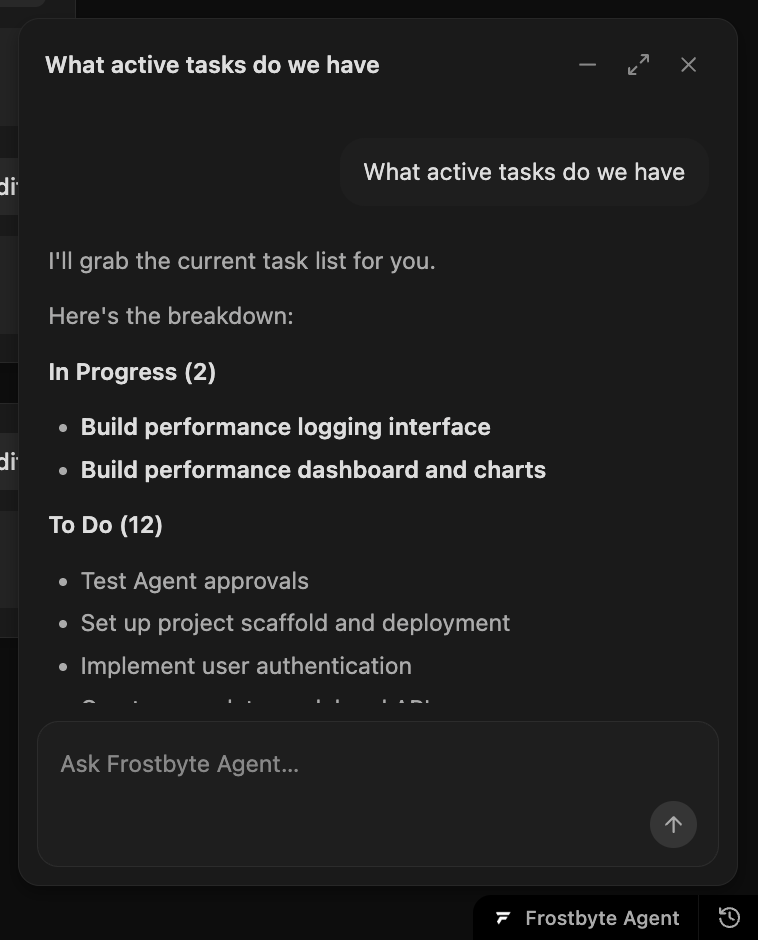
Your coding agent forgets everything between sessions, so you became the one keeping the tracker current — pasting context back in, remembering what shipped, updating tasks by hand. The Frostbyte Agent takes that over.
It sits in the corner of every project page. Ask what's active, what's blocked, or what to ship next and it answers from your real tasks, releases, and areas — then makes the changes for you. No tab-switching, no re-explaining the project.
It changes things — with your sign-off
The agent doesn't act behind your back. Routine work — creating a task, moving a status, drafting a release — applies as you watch. Anything destructive, like deleting work, waits for an explicit approval.
You stay the reviewer. The agent does the upkeep; you decide what sticks.
Give it the context that matters
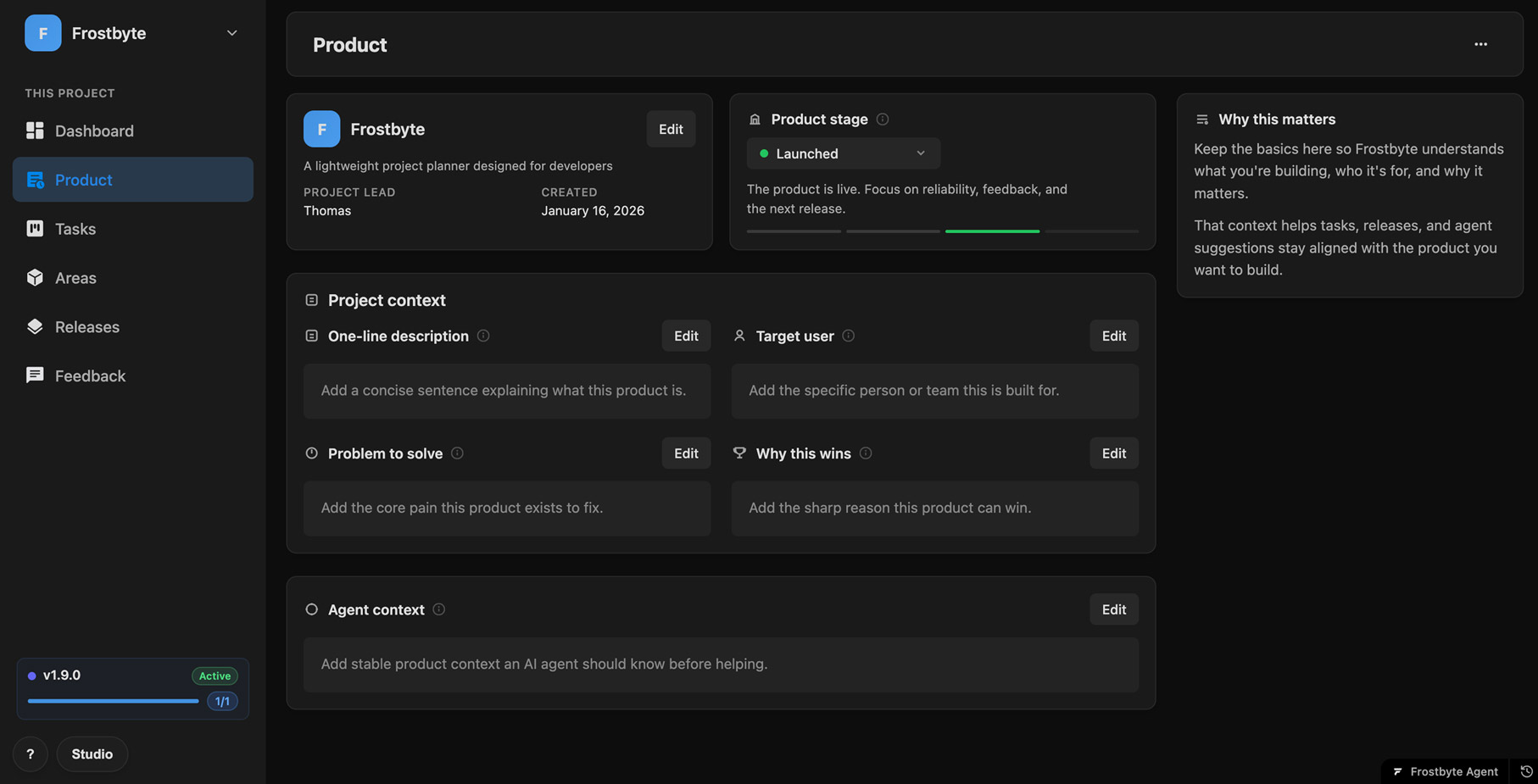
Good suggestions need a shared brief. The new Product page is where it lives — a one-line description, who it's for, the problem it solves, and why it wins, alongside the product's current stage.
The agent reads this before it helps, so its tasks and releases stay pointed at the product you're actually building instead of a generic guess.
A guided start for new projects
New projects no longer drop you into an empty board. They open with a short set of guided tasks — add product context, map your areas, plan a first release, connect your coding agent — and each one can hand off to the agent if you'd rather not do it by hand.
AI work is usage-based, too. The agent routes between faster and deeper models on its own, and your monthly usage and reset date sit in Settings.
New features
- Agent In-app Frostbyte Agent on every project page — ask in plain language, it reads and writes your tasks, areas, and releases
- Agent Approval flow: routine writes apply live, destructive actions need your explicit yes
- Agent Chat history you can revisit and delete
- Agent Quick-action prompts to kick off common requests
- Product Product page: product stage, one-line description, target user, problem, and why-it-wins in one place
- Product Agent context field the agent reads before it helps
- Onboarding Guided onboarding tasks for new projects, each with one-tap agent handoff
- Onboarding "Connect your coding agent" task with Claude Code and Codex setup
- AI Credits Usage-based AI credits with automatic Haiku/Sonnet model routing
Improvements
- AI Credits AI usage and reset date visible in Settings
- Agent Streamed replies; minimise keeps the conversation, close clears it
- Product Product stages consolidated into one canonical set across the app
- Security Agent write-scope and credit handling hardened
Bug fixes
- Agent Agent project scoping and streamed-markdown rendering fixed
- Billing Credit-reset handling stabilized
- Agent Proposal race, abort, and chat-history edge cases fixed
Custom Domains & Embed Widget
v1.9.0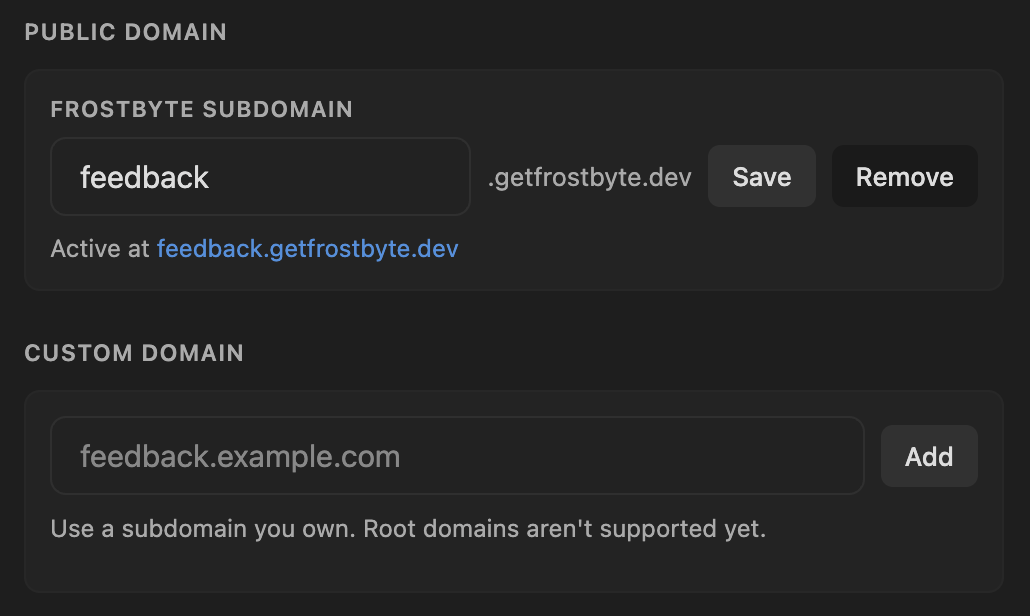
Your public Feedback Hub used to live on a Frostbyte URL. Now it can live on yours. Point a subdomain you own at the hub, add the records we show you, and verify — your portal runs on your own brand, end to end.
Don't want to touch DNS? Claim a free name.getfrostbyte.dev subdomain in one field and the portal is live instantly.
Embed feedback anywhere
A new widget drops your bug, feature, and general feedback forms straight onto your own site — one script tag, copied from Feedback Hub settings. Your users submit without ever leaving your app.
Cleaner, white-label portals
Public portals now serve from clean root-path URLs. On the Studio plan you can remove the "Powered by Frostbyte" branding entirely, for a portal that reads as fully yours.
New features
- Feedback Hub Custom domain support for public Feedback Hub portals, with DNS verification and set-primary
- Feedback Hub One-field Frostbyte subdomain (name.getfrostbyte.dev) for an instant portal URL
- Feedback Hub Embeddable feedback widget via a one-line script tag
- Feedback Hub Copy the embed snippet from Feedback Hub settings
- Feedback Hub Remove "Powered by Frostbyte" branding on public portals (Studio)
- Feedback Hub Public portals served from clean root-path URLs
Improvements
- Feedback Hub Feedback Hub settings reorganized with domain, embed, and branding controls
- Marketing Refreshed landing page with hero app preview, signal-flow demo, and changelog strip
- SEO Brand and SEO schema plus homepage title updates for clearer search results
- Mobile Responsive layout improvements for task and release lists and headers on mobile
Bug fixes
- Feedback Hub Embed widget colors and spacing aligned with the hub and docs
- Feedback Hub Public portal links and subdomain handling fixed
- Security Project page membership and API authorization hardened
Agent Auto-Tracking
v1.8.0Until now, you had to remind your agent which Frostbyte project it was working in at the start of every session. Auto-tracking removes that repeat setup. Add a small `.frostbyte.json` file to the repo, commit it, and new Claude Code or Codex sessions start with the right project context.
The link file holds only the project ID. On session start, a hook reads that ID and tells the agent which project to use. The authenticated read still happens through the MCP server you already connected, so the hook never touches your API token or sends code anywhere.
Tasks that keep themselves honest
Once the agent knows the project, it can keep the task list current while it works. It starts the task you asked for, suggests a new one when the work is big enough to track, adds subtasks to work already in progress, and marks finished tasks done with a short note on what changed.
New tasks go into the best-fitting existing area when there is one. Releases are left alone unless you ask. Creating a project, linking a repo, opening a task, or creating an area still requires your explicit yes, so the workspace stays a record of what actually happened.
Onboarding, and a few MCP fixes
Working in a repo that is not linked yet? The new onboarding skill offers to sort it out at a natural point. For a fresh codebase, it can create a Frostbyte project and seed the first tasks. For an existing codebase, it can match the repo to one of your projects and write the `.frostbyte.json` file.
We also corrected the plugin's area and release tool references so the agent calls the MCP tools that actually exist, and added Auto-tracking docs with the Claude Code and Codex setup paths.
New features
- Agents `.frostbyte.json` repo link file for connecting a codebase to a Frostbyte project
- Agents Session grounding for Claude Code and Codex through the plugin hook
- MCP Grounded task policy: start matching tasks, propose new tasks, add subtasks, and complete finished work
- Agents Onboarding skill that offers to create a new Frostbyte project or link an existing one
- Security Token-safe grounding: the hook only injects the project ID; MCP handles authenticated reads
Improvements
- MCP Agent-created tasks land in the best-fitting area; new areas only when nothing fits
- MCP Dead or revoked project links are surfaced so the repo can be relinked
- Agents Per-repo grounding opt-out with `grounding: false`
- Docs Auto-tracking docs added for Claude Code and Codex users
Bug fixes
- MCP Fixed plugin MCP tool references for area and release actions so the agent calls the right ones
Auto Project Setup
v1.7.0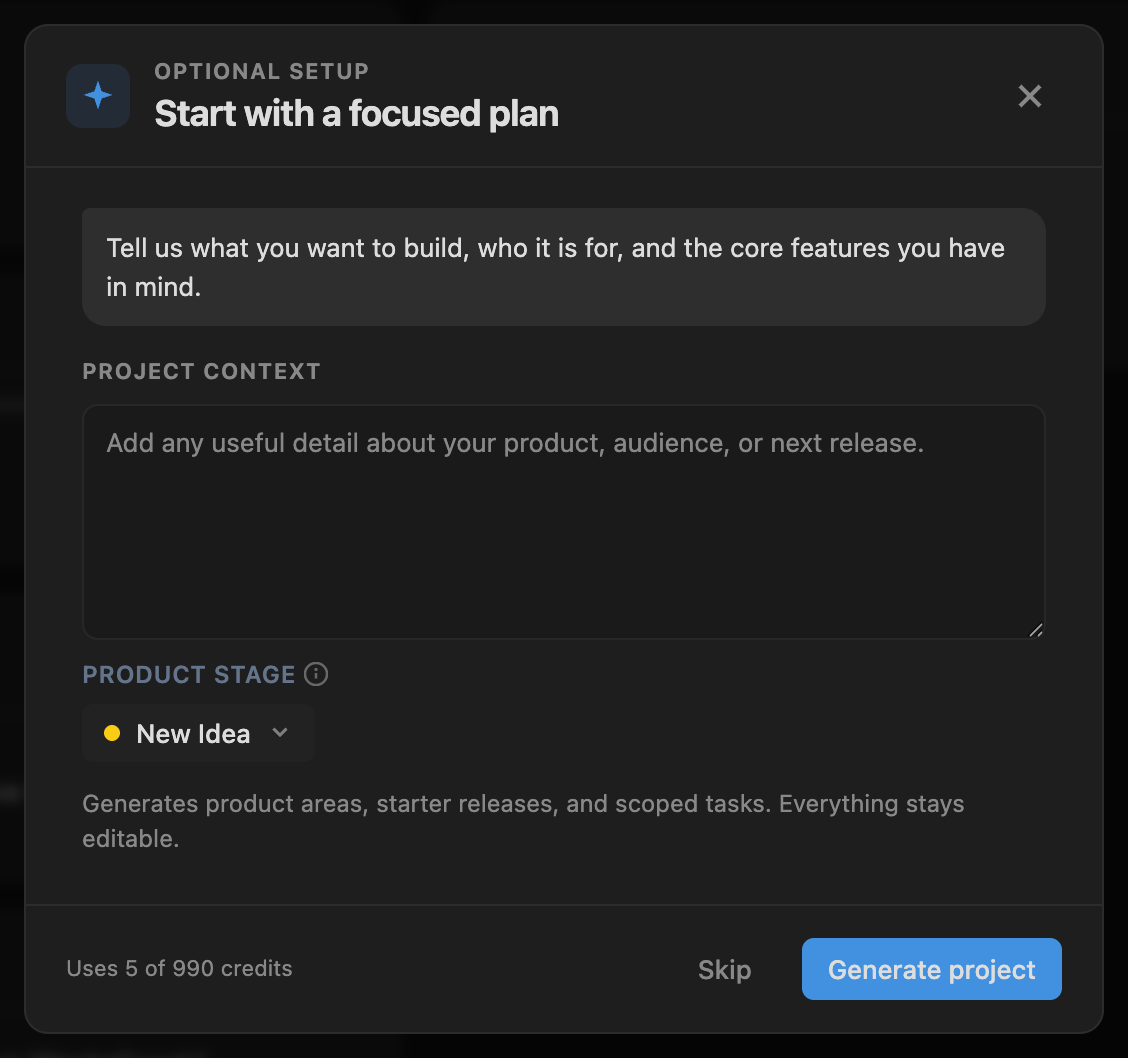
New projects now create immediately, with auto setup being an optional step. You no longer have to wait for AI setup before you can enter the workspace, rename things, invite collaborators, or start writing tasks.
When you do want help, Frostbyte opens an optional AI setup flow after the project exists. Describe the product, review the generated areas, releases, and starter tasks, then apply the plan when it looks right.
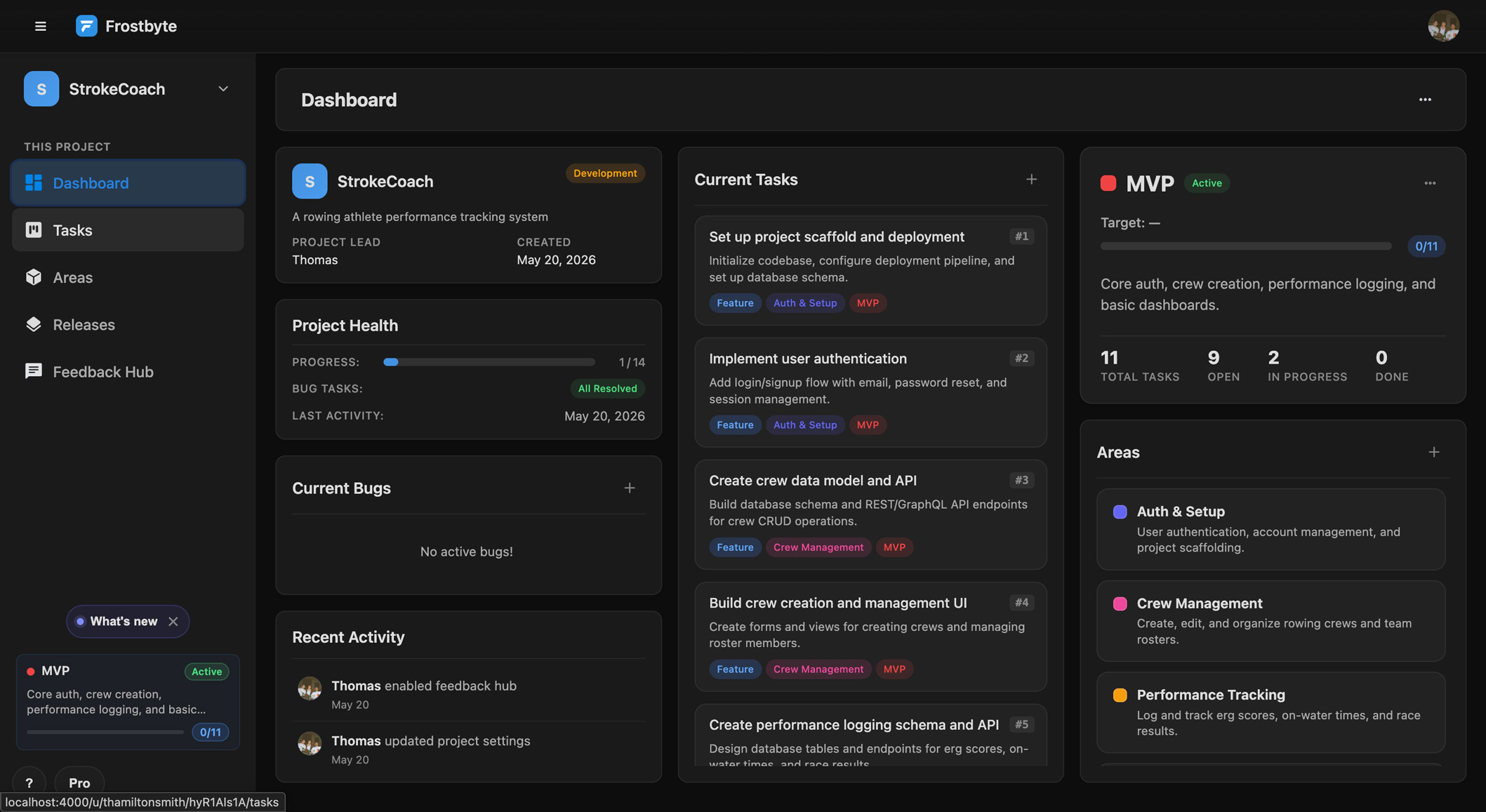
Generated starter workspace
After setup runs, the project lands with a usable first pass: scoped tasks, product areas, and an active starter release. Everything is editable, so the AI gives you a starting point without locking in the plan.
AI setup with safer recovery
AI setup now handles failures more carefully. If a setup run fails or needs to be rolled back, the project stays usable and the modal gives you a clearer path to retry.
Starter plan limits are enforced before activity is finalized, so users see credit and plan boundaries before Frostbyte commits the generated setup work.
New features
- Projects Immediate project creation — new projects open before optional AI setup begins
- AI Setup Post-create AI setup modal for generating starter areas, releases, and tasks after the workspace exists
- AI Setup AI setup rollback path when generated starter work cannot be applied cleanly
Improvements
- Billing Starter plan limits are checked before AI setup activity is finalized
- AI Setup AI setup retry and error states now give users a clearer next step
- Accessibility AI setup modal accessibility and dialog behaviour improved
- Docs Auto project setup and getting-started docs updated to match the new flow
Bug fixes
- AI Setup AI setup can now recover from failed setup runs without leaving the new-project flow stuck
Feedback Loop
v1.6.0AI-assisted project setup can now turn a product description and connected repo context into starter areas, releases, and tasks. It gives the agent a structured backlog before the first real work session starts.

Smarter releases
Releases are easier to start and easier to write up. Frostbyte can suggest the next release name, prefill release descriptions from completed task titles, and draft public release notes from shipped work.
MCP release creation now also knows how to suggest a release name when one is omitted, keeping agent-created releases consistent with the in-product flow.
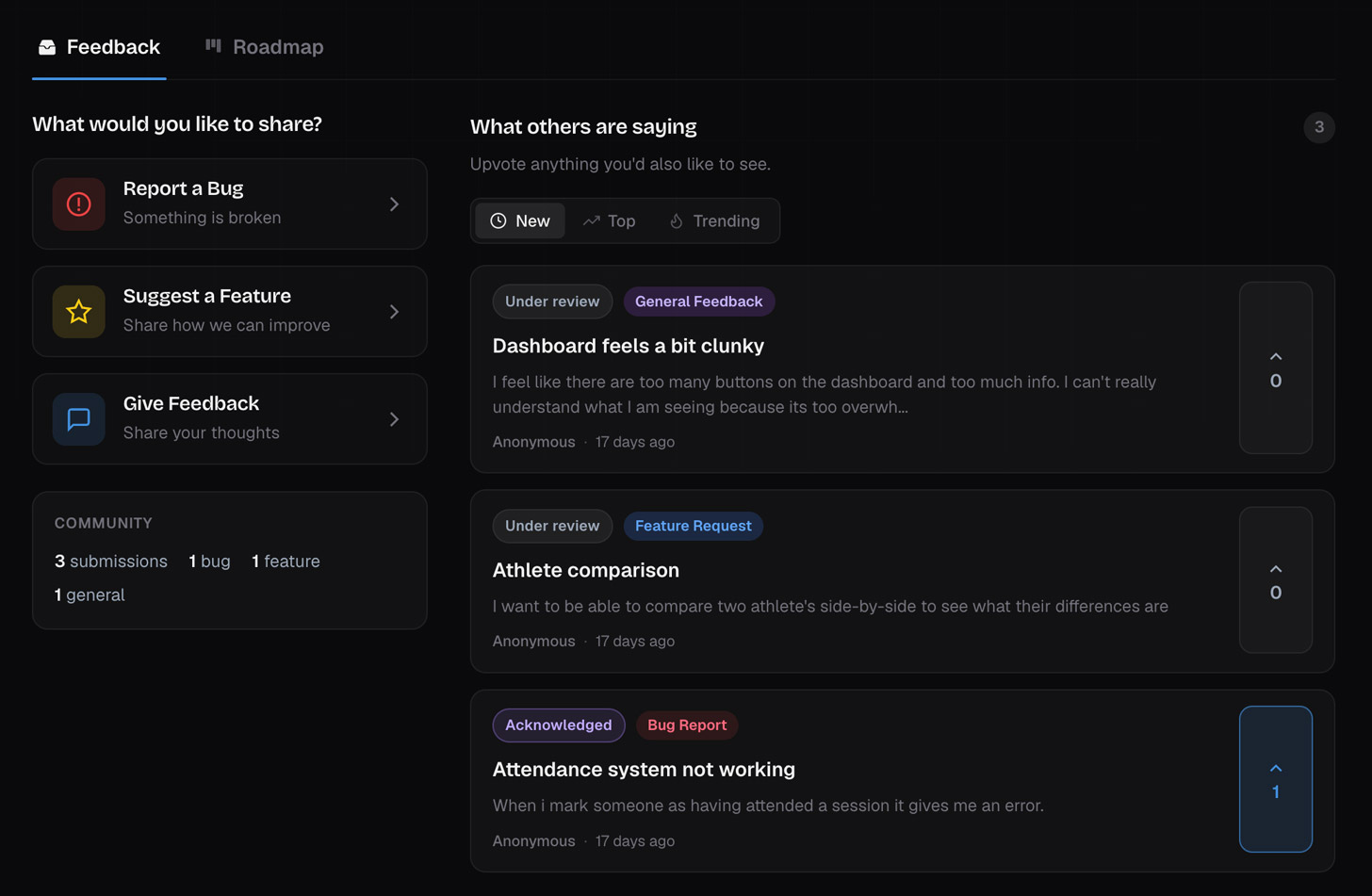
Feedback loop upgrades
Feedback Hub moved from simple intake toward an actual feedback loop. Public voting, stronger moderation tools, AI rewrite, convert-to-task support, task linking, and shipped-feedback notifications help you turn user signal into scoped work.
AI credit tracking and plan limits now sit underneath those workflows, so expensive actions are gated, metered, and shown in the places where users need the context.
Docs and articles
The docs are now a multi-page system with grouped navigation, mobile sidebar behaviour, search, and table-of-contents support.
We also added a large set of product and developer workflow articles, including TLDR support and article metadata, so founders can learn the workflow without digging through the app first.
New features
- AI Setup AI-assisted project bootstrap that generates starter areas, releases, and tasks from product/repo context
- MCP New MCP planning tools for agent-driven project work
- Releases Draft with AI button for release notes
- Releases Smart next-name suggestions in the New Release modal
- Releases Release descriptions can be prefilled with completed task titles
- MCP MCP create_release can auto-suggest a release name when omitted
- Releases Public release-notes field for releases
- Feedback Hub Public roadmap voting
- Feedback Hub Feedback moderation actions in the project Feedback Hub
- Feedback Hub AI rewrite for feedback submissions
- Feedback Hub Convert feedback into task-ready copy with AI
- Feedback Hub Link existing tasks to feedback submissions
- Feedback Hub Notify users when linked feedback ships
- AI Credits AI credit pool and plan limits for AI actions
- AI Credits Clear limit handling when credits run out
- Docs Multi-page docs with grouped navigation, search, and table of contents
- Articles Product and developer workflow article library with TLDR support
Improvements
- AI Credits Inline AI credit costs added to setup, release, and feedback workflows
- Feedback Hub Feedback Hub UI updated with stronger moderation, voting, link-task, and empty-state handling
- Releases Release notes editor now shares more consistent markdown, autosave, and realtime behaviour
- Realtime Task sorting, realtime rendering parity, and modal refresh behaviour tightened
- Docs Docs sidebar accessibility, mobile behaviour, sticky layout, and last-updated formatting improved
- Billing Pricing, plan labels, support docs, and feature docs updated around pooled AI credits
Bug fixes
- AI Credits Credit checks now block gated AI/MCP actions more consistently
- Feedback Hub Vote rate limiting and duplicate vote handling hardened
- Feedback Hub Feedback Hub actions, task linking, and realtime updates are more reliable
- Releases Release notes drafting is more consistent
- Docs Docs links and older anchors resolve more reliably
CSV Import and Onboarding Improvements
v1.5.0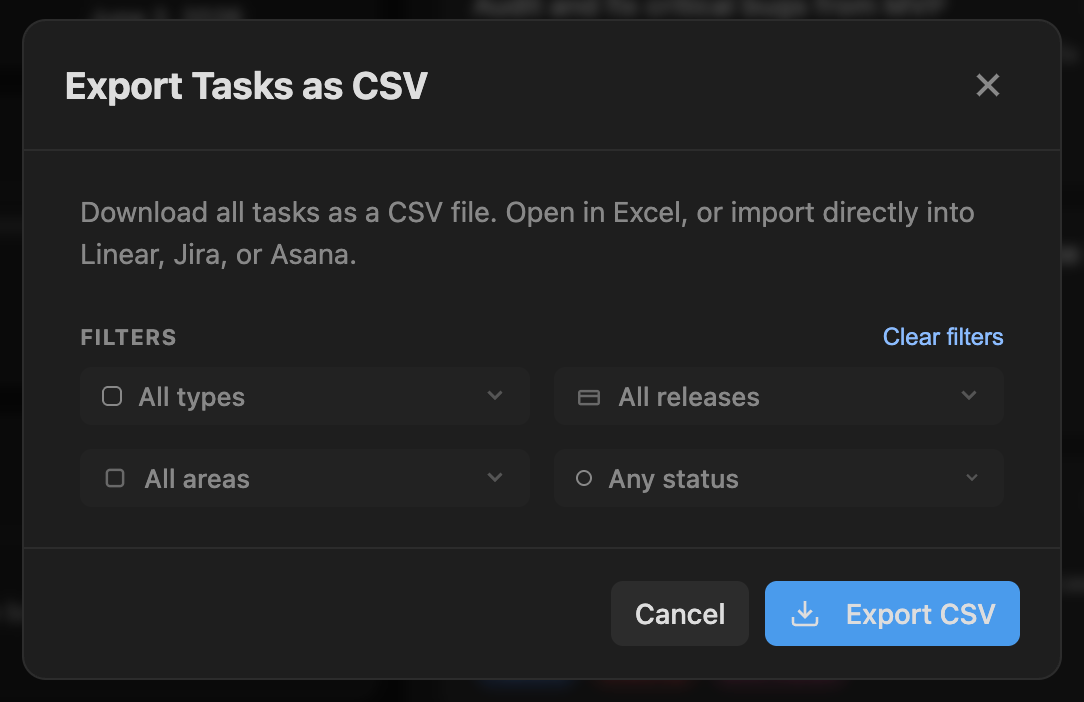
CSV import and export are now built into projects via their settings dropdown. You can bring tasks in from another tool, export work for reporting, and keep import sessions scoped to the right project.
The new import/export modals handle file selection, backdrop behaviour, plan limits, export headers, and import-session persistence, so migration is no longer a one-off script.
Project onboarding
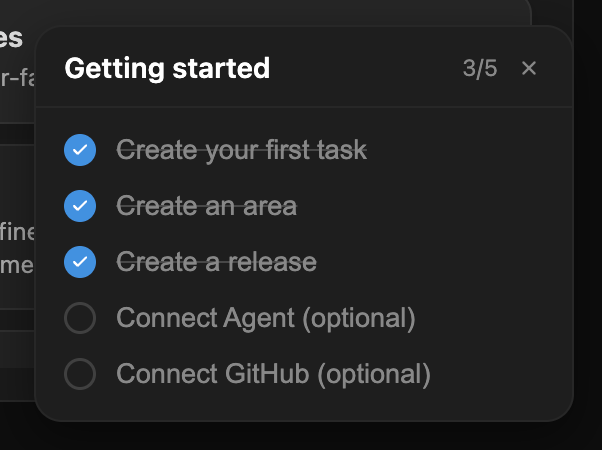
New projects now have a setup checklist that persists as users complete early steps. It gives founders a simple path from empty workspace to useful tracker without adding a heavyweight onboarding wizard.
The new-project and onboarding modals were refreshed, and the older quick-start flow was removed in favour of clearer setup actions in the actual workspace.
Lifecycle emails
Frostbyte can now send lifecycle, activation, billing, task assignment, and Feedback Hub notification emails. Users also get a clearer unsubscribe flow for email preferences.
New features
- CSV CSV import flow for bringing existing task lists into a project
- CSV CSV export flow for downloading project work
- CSV Import progress stays tied to the project you're working in
- CSV Import limits for plans that should not accept unlimited migration work
- Onboarding Project setup checklist that persists completion state
- Onboarding Setup checklist widget in the project UI
- Notifications Task assignment and Feedback Hub submission emails
- Email Lifecycle emails for helping users return to unfinished setup and release work
- Email Activation email templates for adding tasks, finishing setup, starting a release, returning to Frostbyte, and never-started users
- Billing Billing-status and premium-guidance emails for paid-plan users
- Email Unsubscribe page for managing email opt-outs
Improvements
- Onboarding New-project and onboarding modals refreshed for clearer setup flow
- Onboarding Quick-start modal removed in favour of setup actions that live in the project
- Realtime Task card ordering is preserved more reliably during realtime updates
- Realtime Open modals refresh more safely when project data changes in realtime
- GitHub GitHub link handling improved in realtime task/card updates
- Billing Billing and lifecycle messaging now use more consistent plan language
- Email Email failures are handled more gracefully
Bug fixes
- Realtime Task cards and open modals now update more reliably during realtime changes
- Email Lifecycle email links are validated more strictly
- Email Unsubscribe tracking is more accurate
- Auth GitHub OAuth data is preserved during signup
- Auth Email confirmation flow fixed for affected users
Releases Upgrades
v1.4.0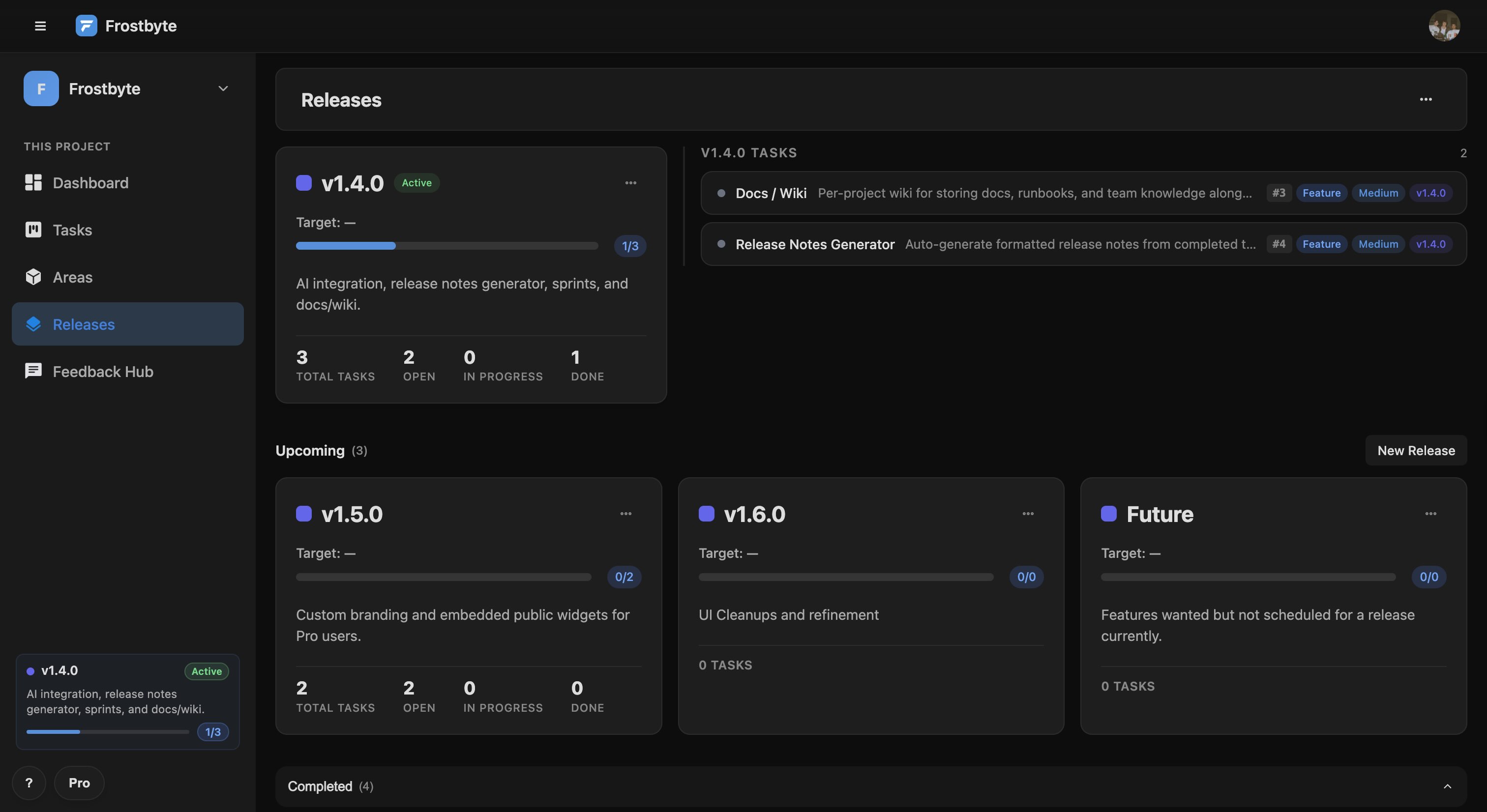
The releases page now leads with an active release hero — a dedicated zone at the top that shows your active release card alongside the tasks that need attention right now. In-progress and open tasks are surfaced in priority order, so you can see what's left to ship without opening each one.
Each release card now has an inline action menu. Edit, set as active, or delete without navigating away. Setting a new release as active automatically demotes the previous one and syncs the change across every connected session in realtime.
Task list view
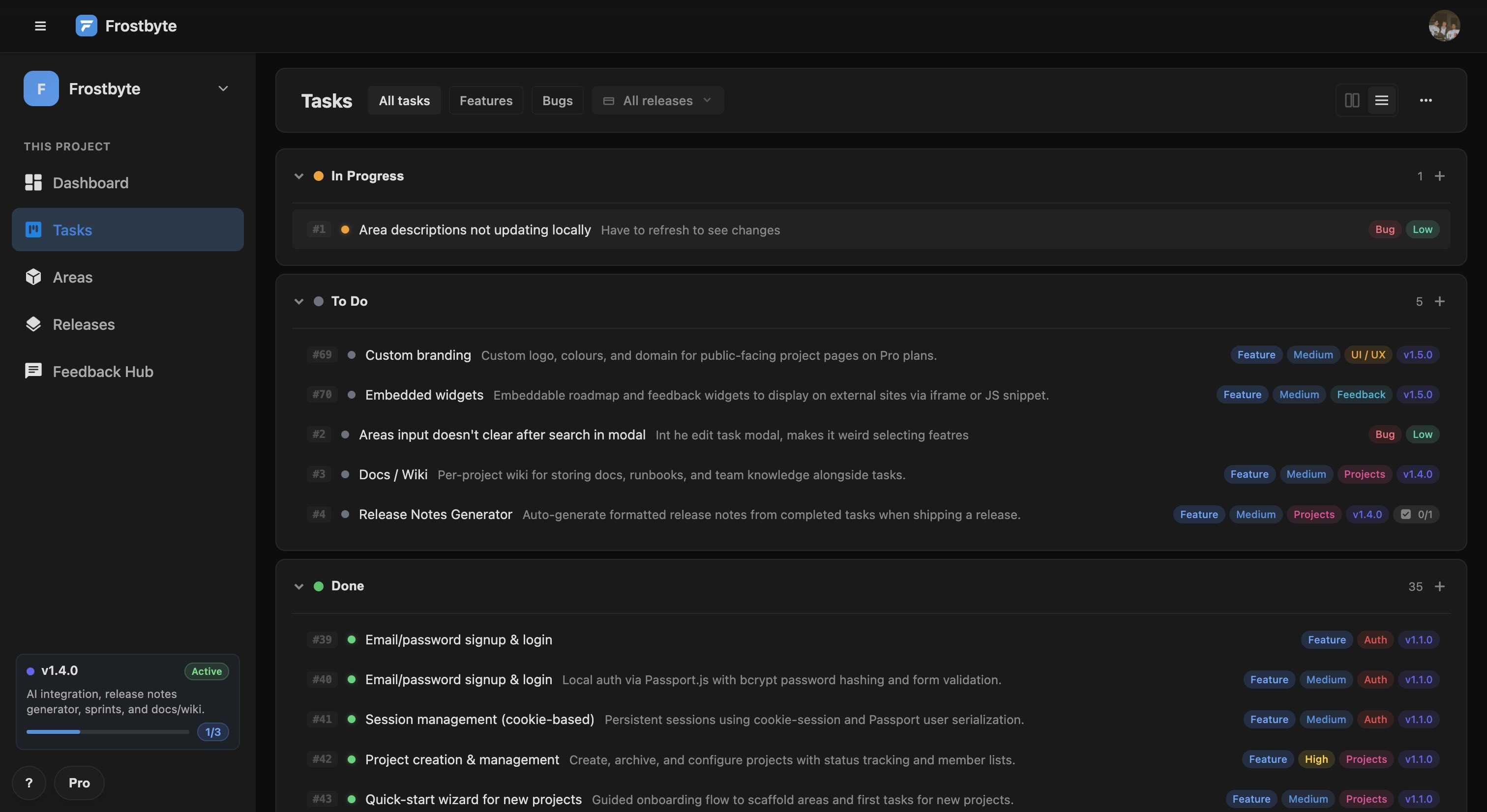
The task board has a new list view. Toggle between board and list from the toolbar — the view persists so you don't have to switch every time you come back. Both views now have collapsible sections so you can fold away status columns you're not focused on.
Per-section add buttons let you drop a task directly into a status column with one click. Task counts in each section header update in realtime as cards move.
Active release in the sidebar
The project sidebar now shows a widget for your active release: name, target date, days remaining, and a live progress bar. It updates as tasks complete so you always know where the release stands without switching pages.
New features
- Releases Active release hero zone on the releases page — surfaces the active release card and top in-progress/open tasks in priority order
- Tasks Task list view — toggle between board and list in the tasks toolbar, persists across sessions
- Sidebar Active release sidebar widget showing name, target date, and a live progress bar
- Releases Inline action menu on release cards — Edit, Set as active, Delete without leaving the page
- Tasks Per-section add buttons to create a task pre-set to a status with one click
Improvements
- Tasks Status columns are now collapsible — fold any section you're not focused on
- Tasks Task count shown in each section header, updates in realtime
- Releases Target date badges now show three states: overdue (red), due today (amber), upcoming (default)
- Releases Setting a release as active demotes the previous one instantly across all connected clients
- Areas Area descriptions sync to task cards in realtime when updated
- Tasks Task number badge (#123) now shown on task cards in the board and dashboard views
Bug fixes
- Releases Release demotion now propagates correctly in realtime when a new active release is set
- Sidebar Sidebar release widget refreshes correctly when tasks and releases change
- Areas Area description changes now reflect on related task cards without a page reload
- Releases Active release name is now properly escaped to prevent rendering issues
MCP Server
v1.3.0The Model Context Protocol (MCP) is an open standard that lets AI assistants like Claude talk directly to external tools. With the Frostbyte MCP server, you can manage your projects, tasks, areas, and releases through natural conversation — no context-switching required.
Ask Claude to create a task, move something to done, list what's in progress, or set up a release. It reads and writes directly to your Frostbyte data in real time.
Getting started
The MCP server is fully hosted — there is nothing to download or run locally. Generate an API token from Settings → API Access, then connect any MCP-compatible client using the endpoint https://getfrostbyte.dev/mcp with your token as a Bearer header. Full setup instructions are in the docs.
The server exposes 16 tools covering the full project lifecycle: listing and creating projects, tasks, areas, and releases; updating any field on any entity; deleting tasks; and reading the activity feed.
New features
- MCP MCP server exposing 16 tools for managing projects, tasks, areas, and releases
- Settings API token generation and revocation in Settings → API Access
- API Bearer token authentication for all API routes
- MCP list_projects — list all your projects with task counts and progress
- MCP get_project — task, area, and release summary for a project
- MCP create_project and update_project — manage project metadata
- MCP list_tasks, get_task, create_task, update_task, delete_task — full task lifecycle
- MCP list_areas, create_area, update_area — manage project areas
- MCP list_releases, create_release, update_release — manage releases
- MCP get_activity — read the recent activity feed for a project
Improvements
- API PATCH endpoints for tasks, areas, and releases now accept partial updates
- API GET endpoints added for tasks, areas, and releases
Feedback Hub & Public Roadmap
v1.2.0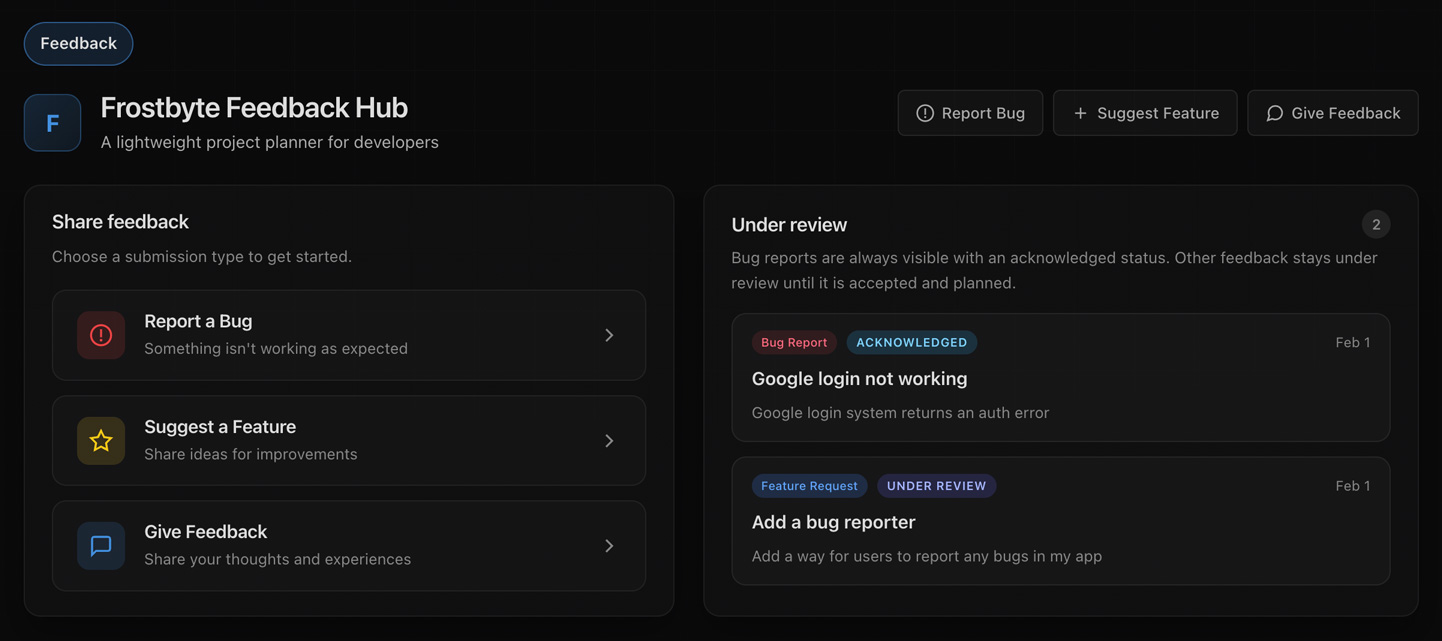
The Feedback Hub gives you a shareable portal where users can submit bug reports, feature requests, and general feedback. You review everything in a moderation queue and turn submissions into tasks with one click. No more copying stuff between tools.
Each form is tailored to its purpose. Bug reports ask for severity and repro steps. Feature requests focus on the use case and why it matters. General feedback is a catch-all for everything else. Accept a submission and it becomes a task. Decline it and move on.
Public Roadmap
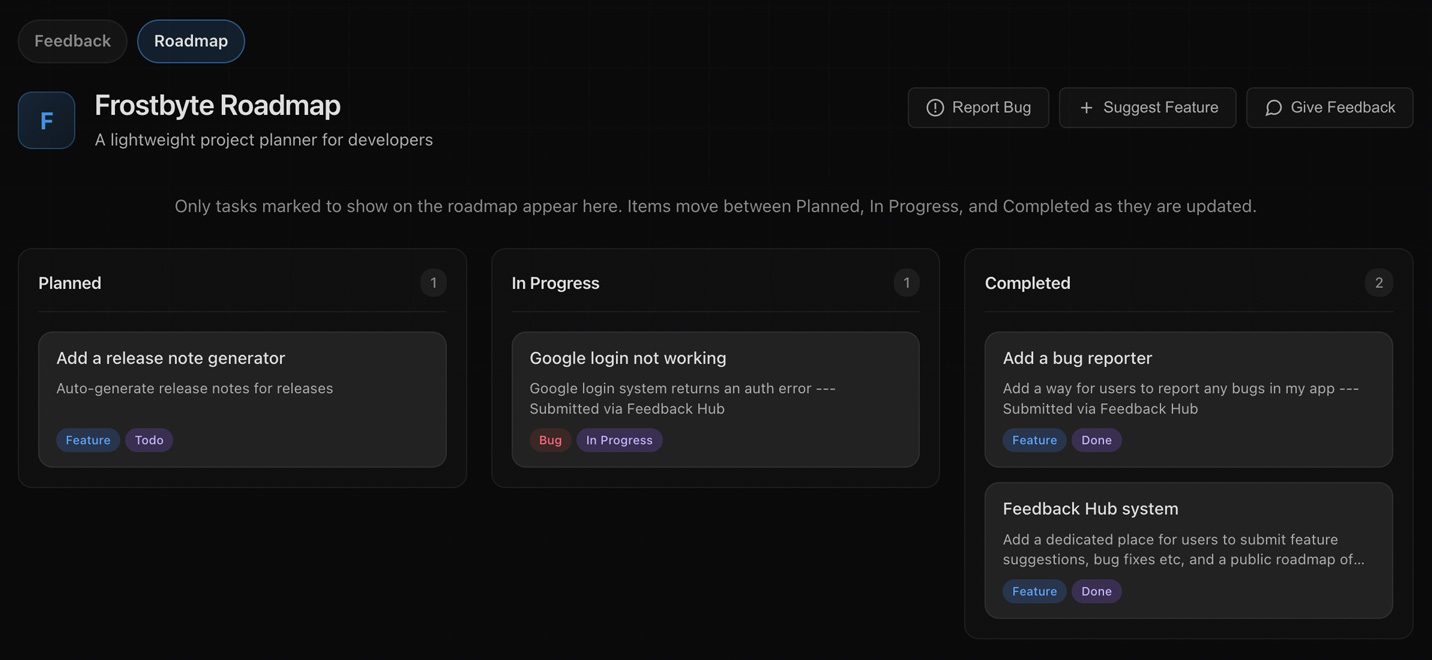
Show users what you're working on with a public roadmap. Toggle visibility on individual tasks and they'll appear on a dedicated page in your Feedback Hub. Users see what's planned, what's in progress, and what's done.
The roadmap updates itself as you work. Tasks move between columns when their status changes, and you decide exactly what's public. Your internal project stays private.
Smart Routing & Real-time Sync
Set up the Feedback Hub to auto-attach accepted submissions to your active release. Bugs can go straight into the current release while feature requests land in the backlog. You choose how each type gets routed.
New submissions show up instantly in your queue via real-time updates. Your team can triage quickly and keep users in the loop.
New features
- Feedback Hub Public Feedback Hub portal with shareable token-based links
- Feedback Hub Three submission types: bug reports, feature suggestions, and general feedback
- Feedback Hub Deep-link URLs that open specific submission forms directly
- Feedback Hub Moderation queue with accept/decline actions inside projects
- Feedback Hub Turn accepted submissions into tasks automatically
- Feedback Hub Field mapping from severity to priority, repro steps, and type
- Feedback Hub Capture submitter name and email for follow-up (optional)
- Feedback Hub Auto-attach accepted submissions to active release with separate bug/feature toggles
- Public Roadmap Public roadmap page showing tasks you've marked visible
- Public Roadmap Roadmap groups tasks by status: Planned, In Progress, Completed
- Public Roadmap Toggle roadmap visibility per task in create and edit modals
- Feedback Hub Enable or disable submission types individually
- Feedback Hub Rate limiting on the submission endpoint to block spam
- Feedback Hub Real-time notifications when new submissions arrive
- Feedback Hub Submission stats tracking (count and last received)
- Feedback Hub Copy-to-clipboard for Feedback Hub and roadmap links
- Feedback Hub Link existing tasks to feedback submissions when accepting
- Feedback Hub Filter submissions by type in the queue
Improvements
- Feedback Hub Feedback Hub settings with unified controls
- UI Submission type cards with icons and descriptions
- UI Severity badges and submitter info on submission cards
- UX Client-side validation and error handling on feedback forms
- UX Back button works properly with modal navigation
- UX Click outside modals to close them
- UX Success message after submission before modal closes
- Public Roadmap Quick feedback buttons on the roadmap page
- UI Empty states for the feedback queue and roadmap sections
- Activity Activity feed tracks when Feedback Hub is enabled or disabled
- UI Responsive layout for forms and roadmap cards
- Security Email verification required to enable Feedback Hub (Studio)
- UI Consistent branding and project name across the hub
- Performance Database indexes for faster submission queries
Bug fixes
- Feedback Hub Feedback Hub tokens are now unique across projects
- Feedback Hub Submission modal resets properly between form types
- Public Roadmap Roadmap visibility toggle saves correctly when editing tasks
- Feedback Hub Accept action validates task creation before removing from queue
- Feedback Hub Disabling Feedback Hub clears the public token
- UX Browser back/forward works correctly with modal URLs
- Feedback Hub Real-time updates keep submission cards in the right order
- Feedback Hub Type filter shows and hides cards correctly
Task Assignments and PDF Export
v1.1.1You can now assign tasks to teammates when creating or editing them. Avatars and initials show up on cards and in the activity feed so you can see who's working on what at a glance.
GitHub Integration Cleanup
GitHub links now appear directly in task modals. We've also tidied up the sync controls so it's clearer what gets pulled in and when. Better feedback when syncing existing tasks and releases too.
PDF Export
Export your kanban boards to PDF with improved layout and grouping. A few new modes as well, including diagrams and full project snapshots.
New features
- Tasks Assign users to tasks from create and edit modals
- Tasks Assignee badges show avatars or initials on task cards
- Export Export projects to PDF with a dedicated export modal
- GitHub Task modals show linked GitHub commits, PRs, and issues
Improvements
- GitHub GitHub assignee sync keeps Frostbyte and GitHub in step
- GitHub Clearer status feedback when syncing existing tasks and releases
- GitHub Better repository caching for GitHub project dropdowns
- Export Export filters and multiple modes: kanban, diagram, full
- Export Mermaid diagram export and richer PDF templates
- UI Profile photos show across activity and assignee UI
Bug fixes
- Types Fixed a breaking global type definition in the frontend
- GitHub Better loading feedback for GitHub links in task modals
GitHub Integration
v1.1.0GitHub integration is here. Link your repos to Frostbyte projects and keep tasks synced with your code. Reference tasks in commits and PRs using the # prefix, same as you would on GitHub.
You can connect GitHub at both the account and project level, so you have control over which repos link to which projects. Tasks sync with GitHub issues, and you can manage everything from your project settings.
All the pull request and repo linking happens through a new GitHub integration modal. Set things up without leaving Frostbyte. Email verification is required for GitHub features as an extra security measure.
Improvements
- GitHub Link GitHub accounts and manage multiple repo integrations
- GitHub Tasks sync automatically with GitHub issues and pull requests
- GitHub Improved GitHub sync for tasks and releases
- GitHub Install the GitHub app from project or account settings
- GitHub Installation sync shows your authenticated repositories
- GitHub Support for multiple GitHub installations per user
- GitHub Task badge prefix changed to # for GitHub-style cross-referencing
- Auth GitHub OAuth linking and unlinking in account settings
- UI GitHub integration controls in project dropdown
- UI Rebuilt GitHub integration modal with better options and flow
- UI Reset button for release date inputs
- UX Loading states during sync with better confirmation feedback
Fixes
- GitHub Better error handling and validation for GitHub integration
- GitHub Task sync handles edge cases and malformed data properly
- Auth Repository linking respects permission boundaries
- Docs Updated docs link in support pages
Bug Reporter
v1.0.1We've cleaned up the public bug reporter so teams can share a simple intake page and toggle it on or off easily. The flow is clearer about where reports end up, and the UI keeps the essentials front and centre.
Account Features
New account security bits including email verification, linking for Google and GitHub, and the option to delete your account. Profile and settings pages give you full control over your workspace and integrations.
UI & Experience
Drag-and-drop reordering is smoother now, date pickers have better controls, and feedback states are more responsive during modal actions. A bunch of UI tweaks to reduce accidental clicks and tidy things up.
Improvements
- Bug Reporter Public bug reporter modal with clearer setup and sharing flow
- Bug Reporter Bug reporter switcher behaves more predictably with better validation
- Bug Reporter Removed extra bug report fields to keep submissions concise
- Security Email verification system to secure accounts
- Auth Account linking for Google and GitHub OAuth
- Account Account deletion with confirmation modal
- Account User profile and settings pages
- UI Date picker improvements with null checks and clear button
- UX Smoother drag-and-drop reordering for tasks
- UX Loading states and inline feedback for modal actions
- Performance PJAX navigation with better error handling
Fixes
- Bug Reporter Date picker handles today and clear button states properly
- Bug Reporter Activity-list include paths fixed in edit modals
- UI Disabled project dropdown actions no longer clickable
- UX Activity modals show inline loading feedback during actions
- UX Drag-and-drop reordering syncs correctly across views
The first version of Frostbyte is live.
v1.0.0Frostbyte is built around three things: Tasks, Areas, and Releases. Tasks are the actual work, whether that's features, bugs, or improvements. Areas let you group related work by system or component so you know which parts of your product are getting attention. Releases tie it all together into shippable milestones with clear scope and progress tracking.
Interface & Experience
The interface stays out of your way. A unified dashboard shows what matters right now: tasks in progress, upcoming deadlines, and release health. No charts and metrics overload. Navigation is fast and keyboard-friendly, with modals and inline editing so you can update work without losing context. Dark mode by default because that's how devs work.
Built for Developers
Frostbyte is a lightweight project planner for developers and small teams who want to ship quality software without the overhead of enterprise tools. Whether you're building a SaaS product, a mobile app, or a game, it adapts to how you work. No forced methodology, no mandatory fields, and no learning curve. Create a project, add some tasks, and start shipping. Project planning that respects your time.
Core Features
- Core Projects with dashboard, tasks board, areas, and releases views
- Tasks Task workflow with status, priority, type, and subtask support
- Areas Areas to organise work by system, component, or team
- Releases Releases with progress tracking and target dates
- Collaboration Real-time collaboration with instant updates across sessions
- UX Fast keyboard-driven navigation and inline editing
Platform
- Auth Secure authentication with email and Google sign-in
- Design Responsive dark interface built for developers
- Features Activity feed and audit trail for transparency